Standard I/O in C
scanf
int scanf ( const char * format, ... );
Read formatted data from stdin
Reads data from stdin and stores them according to the parameter format into the locations pointed by the additional arguments.
The additional arguments should point to already allocated objects of the type specified by their corresponding format specifier within the format string.
Parameters
format
C string that contains a sequence of characters that control how characters extracted from the stream are treated:
Whitespace character: the function will read and ignore any whitespace characters encountered before the next non-whitespace character (whitespace characters include spaces, newline and tab characters). A single whitespace in the format string validates any quantity of whitespace characters extracted from the stream (including none).
Non-whitespace character, except format specifier (%): Any character that is not either a whitespace character (blank, newline or tab) or part of a format specifier (which begin with a % character) causes the function to read the next character from the stream, compare it to this non-whitespace character and if it matches, it is discarded and the function continues with the next character of format. If the character does not match, the function fails, returning and leaving subsequent characters of the stream unread.
Format specifiers: A sequence formed by an initial percentage sign (%) indicates a format specifier, which is used to specify the type and format of the data to be retrieved from the stream and stored into the locations pointed by the additional arguments.
Return Value
On success, the function returns the number of items of the argument list successfully filled. This count can match the expected number of items or be less (even zero) due to a matching failure, a reading error, or the reach of theend-of-file.
#include <stdio.h>

int main ()
{
  char str [80];
  int i;

  printf ("Enter your family name: ");
  scanf ("%79s",str);
  printf ("Enter your age: ");
  scanf ("%d",&i);
  printf ("Mr. %s , %d years old.\n",str,i);
  printf ("Enter a hexadecimal number: ");
  scanf ("%x",&i);
  printf ("You have entered %#x (%d).\n",i,i);

  return 0;
}

printf
int printf ( const char * format, ... );
Print formatted data to stdout
Writes the C string pointed by format to the standard output (stdout). If format includes format specifiers (subsequences beginning with %), the additional arguments following format are formatted and inserted in the resulting string replacing their respective specifiers.
Parameters
- format
- C string that contains the text to be written to stdout.
It can optionally contain embedded format specifiers that are replaced by the values specified in subsequent additional arguments and formatted as requested.
A format specifier follows this prototype: [see compatibility note below]
%[flags][width][.precision][length]specifier
Where the specifier character at the end is the most significant component, since it defines the type and the interpretation of its corresponding argument:specifier Output Example d or i Signed decimal integer 392 u Unsigned decimal integer 7235 o Unsigned octal 610 x Unsigned hexadecimal integer 7fa X Unsigned hexadecimal integer (uppercase) 7FA f Decimal floating point, lowercase 392.65 F Decimal floating point, uppercase 392.65 e Scientific notation (mantissa/exponent), lowercase 3.9265e+2 E Scientific notation (mantissa/exponent), uppercase 3.9265E+2 g Use the shortest representation: %e or %f 392.65 G Use the shortest representation: %E or %F 392.65 a Hexadecimal floating point, lowercase -0xc.90fep-2 A Hexadecimal floating point, uppercase -0XC.90FEP-2 c Character a s String of characters sample p Pointer address b8000000 n Nothing printed.
The corresponding argument must be a pointer to a signed int.
The number of characters written so far is stored in the pointed location.% A % followed by another % character will write a single % to the stream. %
The format specifier can also contain sub-specifiers: flags, width, .precision and modifiers (in that order), which are optional and follow these specifications:flags description - Left-justify within the given field width; Right justification is the default (see width sub-specifier). + Forces to preceed the result with a plus or minus sign (+ or -) even for positive numbers. By default, only negative numbers are preceded with a - sign. (space) If no sign is going to be written, a blank space is inserted before the value. # Used with o, x or X specifiers the value is preceeded with 0, 0x or 0X respectively for values different than zero.
Used with a, A, e, E, f, F, g or G it forces the written output to contain a decimal point even if no more digits follow. By default, if no digits follow, no decimal point is written.0 Left-pads the number with zeroes (0) instead of spaces when padding is specified (see width sub-specifier). width description (number) Minimum number of characters to be printed. If the value to be printed is shorter than this number, the result is padded with blank spaces. The value is not truncated even if the result is larger. The width is not specified in the format string, but as an additional integer value argument preceding the argument that has to be formatted. .precision description .number For integer specifiers (d, i, o, u, x, X): precision specifies the minimum number of digits to be written. If the value to be written is shorter than this number, the result is padded with leading zeros. The value is not truncated even if the result is longer. A precision of 0 means that no character is written for the value 0.
For a, A, e, E, f and F specifiers: this is the number of digits to be printed after the decimal point (by default, this is 6).
For g and G specifiers: This is the maximum number of significant digits to be printed.
For s: this is the maximum number of characters to be printed. By default all characters are printed until the ending null character is encountered.
If the period is specified without an explicit value for precision, 0 is assumed.. The precision is not specified in the format string, but as an additional integer value argument preceding the argument that has to be formatted.
Return Value
On success, the total number of characters written is returned.
If a writing error occurs, a negative number is returned.
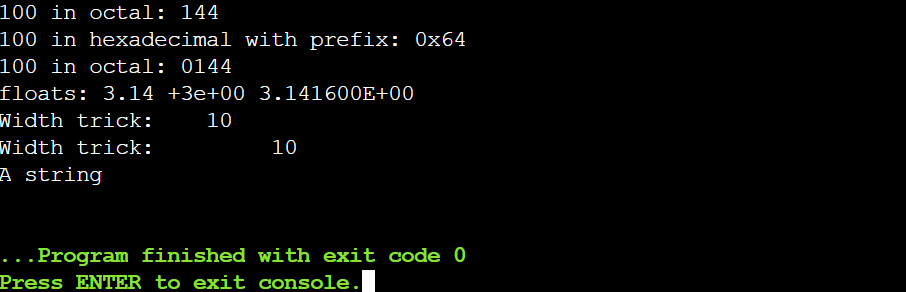
#include <stdio.h>

int main()
{
   printf ("Characters: %c %c \n", 'a', 65);
   printf ("Decimals: %d %ld\n", 1977, 650000L);
   printf ("Preceding with blanks: %10d \n", 1977);
   printf ("Preceding with zeros: %010d \n", 1977);
   printf ("100 in decimal: %d \n", 100);
   printf ("100 in hexadecimal: %x \n", 100);
   printf ("100 in octal: %o \n", 100);
   printf ("100 in hexadecimal with prefix: %#x \n", 100);
   printf ("100 in octal: %#o \n", 100);
   printf ("floats: %4.2f %+.0e %E \n", 3.1416, 3.1416, 3.1416);
   printf ("Width trick: %*d \n", 5, 10);
   printf ("Width trick: %*d \n", 10, 10);
   printf ("%s \n", "A string");
   return 0;
}